
This is part of a series about our vacation to the Galápagos Islands. To see the first article in the series, click here.

Guayaquil, as seen from hotel
It was another short night, with a 5:45 wake-up call, 6:00 breakfast, and a 7:20 departure for the airport. Celeste is starting to look tired, but is otherwise holding up well with the short nights. After breakfast there was enough light to see more of the city from the hotel, and what we were able to see was quite attractive. The short bus ride back to the airport revealed somewhat of a litter problem, but otherwise I might have guessed that I was in southern Europe.
The flight to Baltra was about 90 minutes long on an AeroGal (Aerolineas Galápagos) 737, and featured a second breakfast opportunity. Just before landing, they came through the plane, opened the overhead bins, and sprayed a mild insecticide to protect the fragile environment of the Islands.
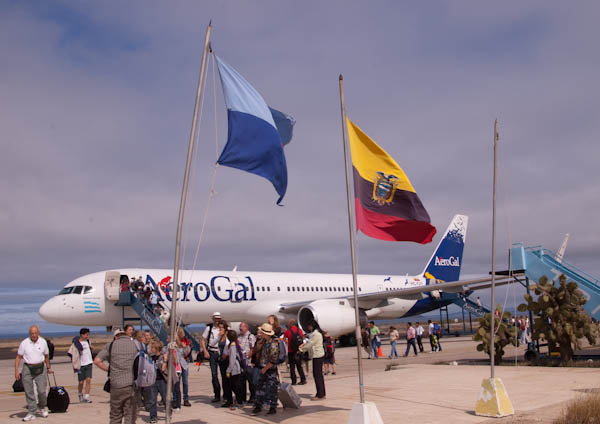
Arrival at Baltra Airport
Baltra itself is a barren place. The island, used as a military base during World War II, seems to consist mostly of a small airport, a port, and a few small military facilities. The airport is surrounded by a surprising number of small souvenir stalls. We took a bus to the port, and were greeted by a marine iguana, a sea lion, and a number of colorful crabs which are a taste of things to come.
We took Zodiac boats to reach the Endeavour. After being led to our cabins (small and cozy but efficient), we attended a series of introductory briefings interspersed with snacks and lunch. Mid-afternoon we finally boarded Zodiac boats for our first hike, on the tiny island of N. Seymour. As we boarded the Zodiac boat, one of the naturalists handed Celeste a “scavenger hunt” list of things to look for on the island. This was one of the many things they do to help keep the kids engaged.
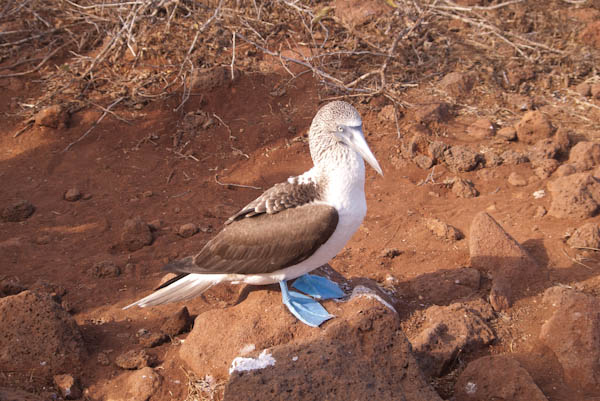
Blue-Footed Booby
All tours of Galápagos are led by certified naturalist guides who also make sure that we don’t stray off the marked trails, get too close to the wildlife, or other no-nos. Our guide, Walter, was a wealth of knowledge about what we were seeing and hearing. At the beginning of the hike, everyone jostled to take pictures of wildlife that Walter pointed out. I started getting annoyed with a sub-species known as the Blue-Jacketed Shutterbug that kept stepping between me and the wildlife. But pretty soon it was clear that this is different from every place I have ever been: there was more to see than we could possibly take pictures of.
Want pictures of the famous Blue-Footed Booby? No problem. Sitting on a nest? Sure. hatching eggs? Yup. Trying to attract a mate? Yes (and I wish I had an audio recording of that whistle they make). Raising young? Uh-huh. And so on.
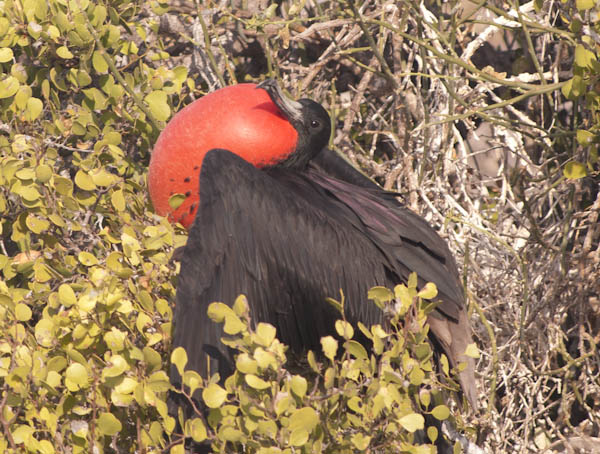
Male Frigate Bird
We got lots of pictures of blue-footed boobies, frigate birds (including that crazy red pouch the male uses when trying to attract a mate), both land and marine iguanas, sea lions and their young (one of which sniffed Celeste to see if she was its mother), and the endemic swallow-tailed gull. All in the course of a 1 1/2 mile walk. It’s true, they aren’t afraid of people, but it’s important to respect their space, which we tried to do.
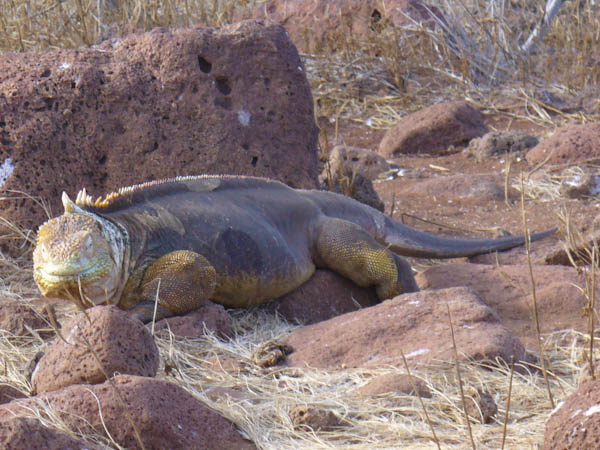
Land Iguana
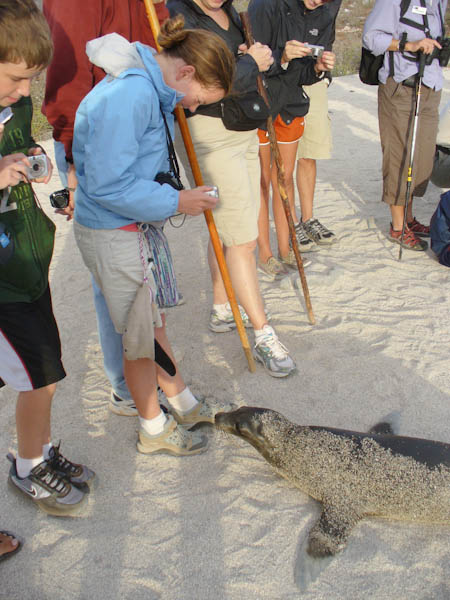
Sea Lion Pup Checking Celeste
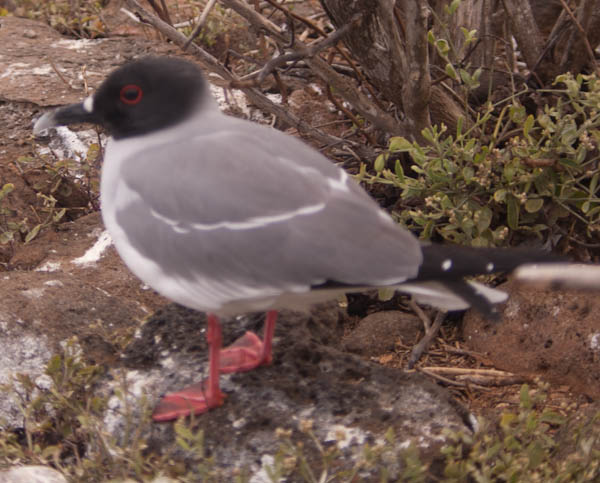
Swallow-tailed gull
This is part of a series about our vacation to the Galápagos Islands. To see the first article in the series, click here.
The day started early. The first leg of the trip was a 6:15 departure for Miami, which by the time you add up the final preparations at home, drive time to SFO, parking shuttle, checking bags, and security, we were looking at about a 3 am wake up time. At least we can doze on the plane…some of us, anyway. Thankfully, the Peet’s Coffee at SFO opens at 5 am so we were able to get our usual “Friday Food” breakfast of coffee/milk and muffins/pastries before we jumped on the plane.
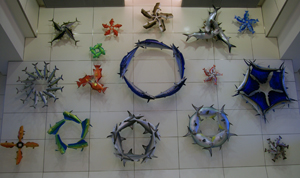
MIA Airport Artwork
Although Kenna and I had driven through Miami many years ago, this was our first connection through the airport. Why does it seem that airports are always under construction? The construction at Miami wasn’t much of an inconvenience other than that many interesting shops and restaurants were “coming soon”. The terminal, however, was quite attractive, quite reminiscent of the new Denver International Airport but with an “islands” theme.
Lindblad had provided us with distinctive blue and yellow ribbons to attach to our luggage and carry-ons, and in the vicinity of the departure gate for our Guayaquil flight we started noticing others with those ribbons on their bags. A Lindblad greeter soon appeared and told us that there were 57 members of our cruise on the flight (since this was the suggested flight for the tour). There are (apparent) retirees and families with children both younger and older than Celeste and quite a few multiple-generation families.
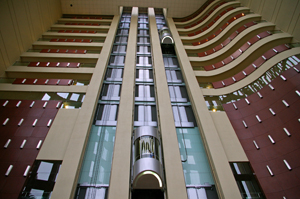
Hilton Guayaquil Atrium
When we arrived in Guayaquil, another Lindblad representative met us as soon as we emerged from Customs, and we were taken by bus to our hotel, the Hilton Colón Guayaquil. Unfortunately, we arrived rather late (about 11:30 pm), so we didn’t get to see much of the city. I was expecting it to be quite warm and perhaps humid, but the weather was very pleasant, in the high 70s. Both the airport and the hotel have a definite European feel.
This year, our family decided to make a 12 day trip to the Galápagos Islands and Quito, Ecuador for our summer vacation. I have gotten so many “Wow!” reactions from friends who ask what we’re doing this summer that I thought It would be worthwhile to keep and publish a journal. Over the next 12 days, I’ll be publishing it in daily installments, offset from real time by two weeks. By spreading the publication out in this way, I should have time to go through the pictures and use a few of them in the articles.
Table of Contents
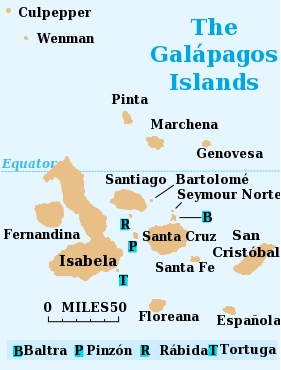
Galapagos Map
- Day 1: San Francisco to Guayaquil
- Day 2: Guayaquil to Baltra and North Seymour
- Day 3: Española Island
- Day 4: Floreana Island
- Day 5: Isabela and Fernandina Islands
- Day 6: Santa Cruz Island / Puerto Ayora
- Day 7: Cerro Dragon and Sombrero Chino
- Day 8: Bartolomé and Santiago Islands
- Day 9: Baltra to Quito
- Day 10: Otavalo and vicinity
- Day 11: Quito
- Day 12: Quito to San Francisco
For those of you that don’t know us personally, our family consists of Jim (your narrator), a networking engineer; my wife Kenna, a community volunteer; and Celeste, our 11 year-old daughter who is entering sixth grade later this month. We travel well together; past vacations have included the usual assortment of fly/drive vacations, a couple of car-camping trips in the Western US, and a couple of trips to Europe. Many of our trips have been somewhat unscripted: We often have a rough idea of where we want to go but fill in the details as we travel. This has led to a few close calls with full hotels and flights, but we have found that this serendipity has almost always led to the best memories of the trip.
In that respect, this trip is quite different from the usual. Everything is planned, reserved, and booked in advance. It is the first cruise any of us has taken (apart from a 24-hour cruise that I took in Sweden once, and 3 days on a submarine long ago) and the first time that we have had it all arranged by a tour operator. We are hoping this won’t seem too constraining, but the advance planning allowed us to look forward to the trip more clearly. We have had a binder in the kitchen into which we have collected articles and other information on Galápagos and Ecuador, and it has been fun to leaf through it and consider what we would see and do.
The cruise we are taking will be on the National Geographic Endeavour, operated by Lindblad Expeditions. Some good friends of ours have taken Lindblad trips in the past, most recently to Antarctica, and spoke very highly of their experiences. The trip features a staff of naturalists as guides, which is a necessity in Galápagos in order to protect the fragile ecosystem. We have shied away from cruises in the past because so many of the ships are just so big, but the Endeavour has a capacity of just 96 guests and therefore seems to be a much more manageable size. I understood from Lindblad that there are often a number of families with kids in Celeste’s age range, and that was also a positive factor in deciding on the cruise.
I’m not inclined to post product testimonials on my blog. But I have lost some weight this year, and a few people have asked me how I did that, expecting to hear the name of a diet or something. But in my case, it’s an iPod Touch/iPhone app that has helped me.
But first, some background. Many people my age have gained weight over the years, but in their youth were relatively fit. That isn’t the case for me; I always struggled with my weight, although I have had a few dieting successes, most notably in 1980 when I lost 50 pounds or so. What I have found helps me the most is to keep records of what I eat. The mere act of writing down what I eat affects my behavior enough to cause me to lose weight. However, in between those successes, my weight inevitably creeps upward until I again find some discipline.
I had decided to embark on a diet this year as a New Year’s resolution when I noticed an item in The New York Times about an iPhone application called Lose It!. I decided to download it to my iPod Touch and give it a try.
Lose It! gives me an easy way to log my eating and my exercise activity. It also includes an extensive database of caloric values for foods, and caloric rates for various types of exercise. When you set up the program, you tell it what your target is and how quickly you would like to lose the weight, and Lose It! calculates a calorie budget for each day. It shows you, on a daily or weekly basis, how much you are over or under budget.
I opted to try to lose 1 1/2 pounds per week. This was a good choice because it wasn’t a “crash” diet and also because my actual weight loss was closer to 1 pound per week. I’m not sure of the reason for that, as I tried to log things faithfully and stayed close to my budget, but perhaps my basal metabolic rate was lower than it expected. In any case, it has required discipline these past six+ months, but has not been an undue hardship.
Needless to say (since I wrote this blog entry), I have been very happy with the results. I set a goal to lose 25 pounds, and achieved that in almost exactly six months. This is slower than my previous diets, but I have a sense that I’m doing a better job of setting a healthy eating pattern than I had previously.
Compared with many other users of Lose It!, my results are modest. If you look at the application reviews on iTunes, you will see many stories of weight loss of 50 pounds or more. These are life-changing results for the people involved. What amazes me is that this is a free application. It obviously receives quite a bit of support from its developer, FitNow. It isn’t at all clear to me how they are making any money from this application. I hope that they have a sustainable business model, because clearly they are doing a lot of good for a lot of people.
So now it’s time to put myself under a bit more pressure. I just got rid of my safety net and threw out a bunch of (now) oversize clothes. Perhaps by blogging about this I’ll also feel a sense of accountability by going public.
Wish me luck continued discipline!
As the father of a girl entering sixth grade in the fall, I was drawn to an article on the front page of this past Monday’s The New York Times dealing with cyberbullying, particularly in middle school. The story highlighted the problems that schools have dealing with this problem, because of inconsistent laws, the fact that much of the behavior happens outside school, and related issues.
The opening to the story introduced an incident where a sixth grade girl received explicit, threatening messages from the cell phone of a 12-year-old boy classmate. The parents had insisted that the boy be punished, but the principal cited the out-of-school nature of the offense, and asked if they had contacted the boy’s family.
Too awkward, they replied. The fathers coach sports together.
These parents seem to think that they can outsource a difficult conversation like this to the school, rather than take responsibility for it themselves. Knowing the other parent through a sports activity is exactly the kind of relationship that should make it easier, not harder, to have a conversation of this sort.
Many parents seem to think that giving their kids access to a computer, an email account, and a little instruction on the mechanics of sending and receiving messages is all they need to teach about email. Or that kids need to know about the 140 character limit for SMS (cell phone text messages) and they’re all set. Wrong on both accounts. Kids need to understand that email messages, text messages, and the like need to be composed with extra sensitivity. Unlike verbal comments, they can be reread, forwarded, and stored indefinitely. There is also the likelihood that, in the absence of visual and tonal cues common in verbal communication, messages can be misinterpreted, and they need to be written to minimize that possibility.
These conversations need to take place between parent and child when they start using electronic media, and need to continue for some time thereafter. Unfortunately, a lot of the parents may not have learned these messages themselves.
The arrangement I have set up for my daughter, which she is very aware of, is that I screen all of her incoming messages except those from a list of trusted addresses. I have a procmail script set up to do this automatically, sending her untrusted messages to a mail folder I control, from which I can redirect messages that look OK to her. This was originally done for spam control, and at this age, I feel it’s appropriate. I expect to eliminate the filtering by the time she’s 13, the age where many of the protections of COPPA go away.
Fortunately, my daughter hasn’t received anything hurtful so far. The worst was a chain letter message that had been forwarded around many times and had the email addresses of probably 100 or so middle school kids. Parents need to recognize that when kids are forwarding these they typically reveal their email addresses (which had often been carefully chosen to be obscure) to a wide audience, something they obviously didn’t intend. Because the messages usually predict dire consequences for those who don’t forward the message, parents need to specifically coach on not propagating such things.
I wonder what education the parents in the story did when setting up their daughter with a cell phone or email. Or did they expect that they could outsource this to her school?
 With all of the discussion of Facebook having gone rogue, I’m beginning to wonder if it isn’t time to dump my Facebook account. This post is an attempt to (1) talk things out, (2) solicit comment, and (3), if I decide to go through with pulling the plug on Facebook, explain my reasoning to people (without the use of Facebook, since my account there would be gone).
I consider myself to be a privacy advocate. To some extent, I rationalize my use of things like Facebook as “research”: the best way for me to understand Facebook is to use it, so that I am equipped to answer questions about it, and to be able to guide my daughter when she gets old enough to have a Facebook account. I similarly have been urging other parents to use Facebook to understand it before their kids get to that point.
Facebook has been a useful tool. I have reconnected with friends from the past, some of whom have gone on to do surprising and cool things. It has been through Facebook that I first learned that my cousin is now a grandfather, and through Facebook I have learned of both great and sad milestones in my friends’ lives.
What I’m Experiencing
I’m noticing an uptick in unusual activity involving my friends on Facebook that neither they nor I are able to explain. Starting a few months ago, I began receiving invitations to various weight loss “events”, allegedly sent by one of my Facebook friends (a former co-worker). While I can definitely stand to lose some weight, it didn’t seem like something this friend would do, and sure enough, he didn’t. I warned him that his account had likely been compromised, and he reported the problem and asked for his account to be shut down, but apparently was told it would take “up to fourteen days” do that. That makes no sense to me [but is partially explained here]. In any case, I have since received a few more of these.
In the past week or two, I have gotten notifications on three occasions that friends have posted things to my Wall. Clicking through the included link, I get the message, “The post is not available anymore.” I asked two of the alleged posters if they in fact posted something and then deleted it, and neither had actually posted anything. I’m not sure what the motivation for an attacker would be to do this, but it makes me a little uneasy.
In another instance, a posting allegedly from a Facebook friend that I know professionally appeared on my Wall from an application called “BFF Quiz” that asked questions like, “Do you think Jim Fenton is hot?”. Of course, he didn’t really post this.
My guess in all of these cases is that some rogue application may be using its privileges to do this. Applications routinely ask for privileges to post things and access friends’ data without explicit consent. I don’t know whether the permissions that applications can be granted is necessarily that coarse, but I generally don’t know why applications need such broad access.
I haven’t opted into Facebook Connections, which supposedly means that work and education information is no longer in my profile. If this happened widely, I would expect the value of Facebook as a way to connect with people would go down; it should not, for example, be possible to find me by searching by my high school class. But it is! Even though that information has supposedly gone away, my profile still lists my employer and my college and year. Hmm. It seems Facebook isn’t being completely transparent about what information is there and what isn’t.
Facebook privacy settings have never been simple, but they seem to be getting more arcane all the time, and seemingly designed to encourage information to be shared. Even though I’m concerned about privacy in general, I’m actually less concerned about my privacy. However, some of the (ironically named) “security questions” used for password recovery at websites use questions like, “What is the name of your High School?” This might cause even the most clean-living individual to think twice about information that is widely shared.
What I’m Hearing
There has been a lot of concern about Facebook expressed lately from organizations such as the Electronic Frontier Foundation (EFF) and Electronic Privacy Information Center (EPIC). EFF has published information including a timeline showing the evolution (erosion) of Facebook privacy policies, and detailed instructions for opting out of Facebook’s instant personalization feature. EPIC has led a legal complaint filed with the Federal Trade Commission and provided guidance on managing Facebook’s privacy settings. Both organizations have done a wonderful job of getting the word out.
Of course, this has mostly to do with the privacy concerns on Facebook, and not the unauthorized posting from accounts that I have been seeing.
What to do?
I have a range of options, but I’ll put them into three categories:
- Keep using Facebook, pretty much as I do now. Which means that I’ll need to be careful, and will need to keep a watch out for things that appear on my Wall (like the BFF Quiz above) that need to be deleted.
- Minimally use Facebook. Remove all but the most vital information, and rely more on other sites, such as LinkedIn and Flickr, for sharing information.
- Quit Facebook entirely. Since I don’t approve of what they’re doing, perhaps I shouldn’t be contributing (however minimally) to their value by being a member. However, I don’t expect that quitting will be easy — Facebook won’t make it easy to quit, and some friends that communicate with me primarily on Facebook will have to use a different medium.
OK, readers, any opinions? Please feel free to suggest what I should do via comments, or via Facebook (if I’m still there!). Or, if they’re short, tweet them.
For several years now, I have been operating the mail server and primary name server for my personal domain at my home. I run secondary name servers for some friends’ domains as well, and also the data collection for our photovoltaic system. All of this necessitates running my Linux machine 24/7, consuming 57 watts or about 500 kWh/year.
 I have frequently wondered if there isn’t a better way to do this without giving up the control I have over my set up. Particularly when I’m on vacation, I get a bit concerned that the server or networking hardware might fail, there might be an extended power failure, or the DSL line serving my home might fail in some way. Not long ago, I did have a router failure right after returning from vacation, apparently brought on by the high temperatures in the attic (I have since moved the router). Another consideration is that I currently need a static IP address for my Linux server; that’s fine for now but it limits my options if I want to change Internet Service Providers. Some of the faster alternatives charge a substantial amount for a static IP.
I started out thinking I wanted a cheap provider of colocation (colo) services. These services cost more than I expected, but they are really more capacity than I need. I soon found out that what I wanted is termed a Virtual Private Server (VPS), a virtual Linux machine to which I would still have root access, running on shared hardware hosted in a data center somewhere.
There are lots of VPS providers available, with similar pricing and offerings. I have been dabbling with IPv6, and decided to vote with my feet in favor of a VPS provider that has native IPv6 connectivity. This also would mean that my DNS and mail server would have good IPv6 connectivity as well. A quick search revealed a blog entry about someone else who had done the same thing.
Somewhat coincidentally, I attended a Meetup featuring about a talk about back-end services for iPhone applications. In the talk, Ramin emphasized how easy and inexpensive it is to set up a VPS. Thus encouraged, I gave it a try. I chose RapidXen, one of the IPv6-enabled VPS providers that has points of presence close to me.
The sign-up process was pretty easy: I chose a modest-sized VPS, which costs about $10/month. The memory allocation seemed small, but it’s important to remember that (1) without any graphics going on, the memory footprint will be smaller, and (2) it’s easy to ask for more if you don’t have enough. I signed up on a Friday evening and thought things were all automated, but found that initial provisioning of new accounts is manual, to avoid fraudulent accounts. This is quite reasonable in today’s climate, and I was up and running in about 24 hours.
I had a couple of things to adjust to. On my home Linux machine I use a mix of command-line and graphical tools for administration; on the VPS everything is command-line. The bigger adjustment was that the VPS uses Debian linux, while I use Fedora at home. A few commands are different (e.g., rpm vs. apt-get), and some of the configuration files are in different places, but there were no major problems.
One of the warnings in Ramin’s talk at the Meetup was that one should get a firewall in place very quickly. He said that he had detected port-scanning attempts within minutes of provisioning a new VPS, so it’s a very good idea to get familiar with firewalls such as iptables in advance. This was a new experience for me, as I’m accustomed to setting these up on my routers, but turned out to be quite straightforward.
I was initially a little surprised that IPv6 wasn’t provisioned by default on my VPS, but this is perhaps a good idea so as not to create a security hole for those who aren’t prepared to configure ip6tables as well as iptables. I opened a trouble ticket, and was given the IPv6 network address I was to use. This needed to be manually configured on my server (not through DHCPv6) in /etc/network/interfaces. Having done this and restarted the network on the server, IPv6 was immediately available.
The only negative so far in the week I have had the VPS is that there have been a couple of hours of downtime. This is apparently because RapidXen had upgraded to Xen 3.4 (from 3.2) and it proved to be unstable. I don’t know if this is typical or not; over a longer period I would expect much less downtime. I’ll therefore move cautiously and start with non-critical services (like DNS secondary) and see how that works. The hard service to move is going to be the monitoring of my photovoltaic system. I’m thinking about trying one of those plug computers to upload the measurements into the cloud, and will post something if I do that.
As I was mentioning to a friend the other day, a VPS like this is a great and very inexpensive way to learn Linux system administration, languages, databases, and so forth. If this doesn’t pan out, $10 times a few months is less than many of the books one might otherwise invest in.
For the past several years, the end of the year has been the time for me to upgrade the home Linux system from Fedora N to Fedora N+2. The Fedora people have the reasonable policy of only providing updates on the most recent two Fedora Linux distributions, and they release a new distribution every six months. So, in order to keep my home Linux system up-to-date, I upgrade to the latest Fedora distribution once a year. I began with Fedora Core 2, am now running Fedora 12, and have run all the even-numbered releases in between.
This year’s upgrade seemed like it had more than the usual number of issues, in part because I’m doing more things with my Linux system these days. Since some of them might be avoided had I been better prepared, I thought I would describe what I ran into.
Performing the Upgrade
I downloaded the Fedora 12 DVD distribution via BitTorrent soon after it came out. As part of the reciprocal nature of BitTorrent, I left my client running until it had uploaded at least two times as much data as I had downloaded. I suggest others do the same. I verified the checksum on the distribution and burned a DVD from it.
The DVD booted fine, but the installer wouldn’t recognize the DVD drive when it came to performing the upgrade. This is apparently a long-standing problem that has existed since Fedora 7, which has been closed as a “can’t be fixed” bug. I haven’t gone through all of the text in the bug in detail, but I have trouble understanding why the installer, anaconda, can’t talk to the drive any more. I must have run into this on either the Fedora 8 or Fedora 10 upgrades, but other than a vague sense of déjà vu, I don’t remember solving this problem.
Fortunately, one of the options available is a network installation. So I created a share on my network-attached storage box, and loaded the distribution DVD onto it. This is done by mounting the ISO image as a “loop” filesystem:
# mount -o loop,ro Fedora-12-i386-DVD.iso /mnt
# mount -t cifs -o username=admin //nas/Fedora12 /mnt2
# cd /mnt2
# tar c /mnt | tar xv
One of the options was to install via http, but after enabling http on the NAS and attempting the installation, the installer crashed. I then enabled NFS and used it successfully for the install.
Graphics
I have an Nvidia graphics board in my system, and as a result the upgrade didn’t have working graphics when it installed. I disabled the ‘nouveau’ video driver (although not sure that was necessary) and installed the nvidia_kmon package and graphics started working again.
Non-standard software
As expected, I needed to recompile the sendmail ‘milters’ that I use for SenderID (sid_milter) and DKIM (opendkim), since they’re not part of the standard Fedora distribution. I also found that I needed to re-install the python_daemon package used by my solar power data connection daemon.
PostgreSQL
I had only recently started using PostgreSQL, since it is used by the DAViCal calendar server I installed recently. I discovered the hard way that new versions (such as 8.3->8.4) of PostgreSQL change the structure of the data they store on disk in a way that is incompatible with previous versions. I should have backed up the PostgreSQL database prior to the upgrade, but didn’t (since I had backed up the entire disk). After checking a few machines I have access to and finding the proper (old) version of PostgreSQL on none of them, I gave up and recreated the database. I hadn’t lost that much because we had just started using the calendar server. A lesson for the future, though.
BIND
I operate a BIND name server on my system for my domain and as a secondary for a couple of friends’ domains. My DNS has two views: An internal view that includes hosts on NATted networks available only internally, and an external view that shows only public addresses. The internal view allows recursion since internally we use my Linux machine as the primary name server, but this stopped working. A little research revealed a change that was made in BIND 9.4.1P1 on the configuration of allowing recursion. Rather than the ‘recursion no;’ or ‘recursion yes;’ statements in the view definitions in the BIND configuration file, these statements are needed in the general section of the file:
allow-recursion { mylan; };
allow-query { any; };
allow-query-cache { mylan; };
DAViCal and PHP
The DAViCal calendar server software uses PHP extensively. While I have had a little experience with its use in MovableType and MediaWiki, I was unprepared when all I got was a white screen (in the browser window) when trying to use DAViCal. At first I thought that there was something wrong with my Apache web server configuration, but after considerable testing found that PHP was working correctly, but something happened with respect to DAViCal since Fedora 10.
After much flailing, I found that the configuration line (in the suggested DAViCal configuration for httpd):
php_value error_reporting "E_ALL & ~E_NOTICE"
doesn’t work because the error flag symbols aren’t available to Apache so all error reporting was turned off. Replacing this with a value of 22527 caused errors to be reported (this value also disables warnings about deprecated code usage). It was now visible that the setting
php_value open_basedir 1
is the wrong thing; open_basedir takes as its value the list of directories that should be available to PHP scripts. I replaced this with:
php_value open_basedir "/usr/share/davical/:/usr/share/awl/:/etc/davical:/tmp"
Including /tmp in the open_basedir is perhaps not a best practice, but in this stance it seemed like it would be OK.
With respect to both of these changes, I wonder how it ever worked under Fedora 10.
Reverse Path Filtering
At this point, I should point out that my Linux machine has two interfaces, one to the network with public IP addresses, and one to the NAT (network address translation) network. The Linux machine does not route packets between the networks though; this and the NAT function is done by a Cisco 881 router. The primary reason for the interface to the NAT network is to give the Linux machine a direct gigabit Ethernet connection to the network-attached storage box.
I noticed that some nodes within the house were mysteriously not working. After considerable packet sniffing and head scratching, I found that it was not possible to ping the public IP address of the Linux machine from the NAT network. The failing hosts were making DNS requests to that public address, which were also failing.
It turns out that by default Fedora 12 is configured by default to perform reverse path filtering, whereby incoming packets are ignored if they aren’t coming from the interface having a route to the source address. In order to change this, one needs to edit /etc/sysctl.conf to change the line:
net.ipv4.conf.default.rp_filter = 1
The right-hand side needs to be changed from 1 to 0. I’m not positive of the default in Fedora 10, but I don’t remember changing this before so I suspect that the default has been changed.
Summary
Having made the above changes, Fedora 12 is working fine, and it’s definitely worth it to be on a release that’s getting bug-fix updates, especially since some of those correct security vulnerabilities. Perhaps I just wasn’t diligent enough in reading the release notes this time. In any case, if I run into any problems upgrading to Fedora 14, I’ll know what the new issues are.
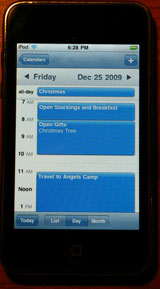 For some time, my wife and I have been looking for a way to coordinate our family calendars electronically. Some time ago, I purchased an iPod Touch and thought its calendar might be appropriate, but at the time the only synchronization it supported was with Microsoft Exchange or with Apple’s MobileMe service. Since I already operate a Linux server at home, I’m not willing to also invest in MobileMe, and running an Exchange server seemed like too much effort just for calendar synchronization.
Apple introduced CalDAV support in the iPhone 3.0 software last June, which cleared that particular logjam. One option is to use a service like Google Calendar as the calendar repository, but my wife doesn’t want to store her calendar off-premises. This gives me a perfect excuse to learn something about calendaring by running a CalDAV server on our home (Fedora) Linux server.
I started by checking to see whether there was an installable CalDAV package for Fedora, but there isn’t just yet. It seems that the Fedora community is looking at that for a future Fedora release, but hasn’t decided on what to include yet. So I started searching around for “CalDAV Linux” and found several candidates.
Darwin Calendar Server — I started with this calendar server, which seemed to be a popular choice. As the name Darwin suggests, this is a calendar server that is oriented toward MacOS, although it will run under other Unix/Linux variants. This largely manifests itself in the locations that it keeps various files. Many of those using this server seem to be using it in “test” mode via the included “run” script. I got the server working briefly this way, but the documentation in that script warns against using it for production. Instead one is supposed to install the server “properly” — a task I found to be difficult to do. It seemed to scatter bits and pieces of the server and packages on which it was dependent (such as the Twisted programming framework) across many different and unfamiliar places on my system, which in turn required other changes. I never did get the server working in this production mode, and soon went looking for an easier solution.
mod_caldav — After the experience with Darwin, this package, which is an extension module for the Apache HTTP Server, looked very attractive. After solving several dependencies, I ran into build errors with one of them, mod_dav_acl. It turns out that one first needs to patch the Apache HTTP Server before building the module. That wasn’t at all attractive, because it meant that I would now need to manually apply any changes to the HTTP Server, such as security patches that were distributed as part of the Fedora update process. Also, the patches applied to an earlier version of the code, and not the version I was running. I gave up on this one, too.
DAViCal — This CalDAV server, previously known as the Really Simple CalDAV Server (RSCDS), was the next one I tried. It’s “native” to the Debian variant of Linux, which uses a somewhat different packaging arrangement for software distribution from Fedora, but is otherwise quite similar. Again, there were a few dependencies that needed to be taken care of, but generally these were available by installing the necessary Fedora packages.
Installation of DAViCal went fairly smoothly. It uses PostgreSQL as its underlying database, which I had used only rarely as most other applications I have use MySQL. I got DAViCal running relatively quickly, although I had to work around a couple of glitches in the installation documentation that I have since reported. I have successfully used it with iCal, iPod touch, Sunbird (PC), and Lightning (both Mac and PC).
Sharing the family calendars required that I learn a bit more about CalDAV. Using DAViCal’s excellent Web administration interface, it was easy to create an account for each member of the family and set up the desired access permissions. I then attempted to log in as myself and create calendars under their names. Unfortunately this meant that now I had a private calendar under my account with their name on it; I wasn’t sharing anything at all. It took a bit of manual URL entering to actually share calendars with family members. Different clients seem to handle this somewhat differently: For example, iCal and iPod Touch require that you create separate accounts (with the same username and password) for each of the calendars you want to share in this manner. Lightning fortunately doesn’t. Also, the Apple clients default to different ports and a somewhat different URL structure than is native to DAViCal. This can be dealt with if you’re willing to do a little work with the Apache configuration files.
At this point, and having “given” calendar services to my family for Christmas, it got to be time to update from Fedora 10 to Fedora 12 (more on that in an upcoming blog post). This hurt in a couple of different ways. First, the Fedora update changed the version of PostgreSQL, which changes the on-disk layout of the database in an incompatible way. PostgreSQL assumes that you have backed up the database before doing the upgrade, and as a PostgreSQL newbie, I hadn’t. Fortunately we hadn’t populated the calendar much yet and could afford to start over. Second, PHP didn’t seem to work any more. A couple of parameters in the DAViCal documentation were set incorrectly; I’m not sure how they worked under Fedora 10 but I’m working with the DAViCal folks on getting the documentation corrected.
Was it worth it? Absolutely. My family loves having calendars they can all refer to and update that show what everybody is doing. I just need to keep that database well backed up now!
We recently moved the furniture in our bedroom, enabling me to use my trusty Kill-A-Watt to measure the energy consumption of some things that were hard to reach previously. By now we’re quite aware of what the consumption of TVs, radios, and satellite receivers is.
We got quite a surprise, however, when we measured the consumption of our electric mattress pad when turned off. Like many contemporary mattress pads, ours (labeled “Safe & Warm”) uses low voltage in response to concerns that many people have about adverse health effects of electric fields. There is a power supply that sits on the floor and provides low voltage to the heating element, and also connects to the user control (on/off switch and temperature dial). As a dual-control mattress pad, there were two controls and power supplies.

Mattress pad power supply
My first hint came when picking up the power supply. It had not been used for several months, yet was warm. The Kill-A-Watt told the story: 4 watts of standby power consumed while turned “off” for each side of the bed. That works out to 70 kWh per year, or a cost of $10.50 per year at 15 cents per kilowatt-hour. I’m really kicking myself for not unplugging the pad during the summer months, at least, during the 5 years or so that we had it.
Unlike the satellite receiver (which downloads program information from the satellite while on standby) and the TV (which is waiting for commands from its IR remote control when on standby), I can’t think of any justification at all for the mattress pad to be consuming 8 watts continuously.
A good clue was a small label on the power supplies: “When operating properly, this power supply remains warm.” But I expected that meant when it was operating, not when it was “off”. It’s ironic that one of the selling points of mattress pads such as this is that they allow one to save energy by turning down your home’s thermostat in the winter.
We’ll be shopping for a new mattress pad soon, and from what I have been able to tell nearly all of them seem to use about the same general design. Hopefully the design has been improved in the past few years. I’ll probably be taking the Kill-A-Watt with me to stores as we decide on a new one. I’ll add a comment below if I find one that seems particularly good.
 Altmode