
This afternoon, the NPR program Marketplace included a story, “Campaign fundraising, pre- and post-primaries“.Host Kai Ryssdal interviewed American University history professor Allan Lichtman. The following comment from Lichtman caught my ear:
The amount of money raised by presidential candidates has just asymptotically increased in recent years. It’s doubled and doubled and doubled again.
I’m one of those people that is amused by people who describe things as having grown exponentially when, in many cases, they have just grown slightly faster than linearly. (I’m particularly amused when the market share of a product is said to grow exponentially.) But in this case, we have real exponential growth — it’s doubling periodically. But asymptotic? Did he really mean that the amount of money raised will be infinite at some point?
Perhaps he was just being hyperbolic.

Capital Bikeshare rack at Dupont Circle
I’m on a business trip in Washington, DC, and it has been a beautiful day today. While walking to my hotel, I noticed a Capital Bikeshare rack about a block away at Dupont Circle. So rather than use the hotel’s fitness center, I decided to go for a ride.
I had heard a great deal about short term bicycle loan services like this one, so I wanted to try it out. The price was very low: $7 for a day pass, which includes as many 30-minute or less rides as I want. They charge extra for longer loans, in order to keep the bikes in circulation. I swiped my credit card and it gave me a numeric code that allowed me to borrow one or two bikes from the rack. It took me a few minutes to understand the procedure the first time, but future loans would be a snap.
The bike was, as expected, very heavy but durable. As I discovered a few times, it’s easy to hit a pothole in DC if you’re not very careful. It was a three speed, with good fenders and chain guard — just what you need if you’re going to bicycle in “civilian clothes”. It was comfortable to ride, with an adjustable seat that is marked so you can quickly set your seat when you borrow another one. I ride down Massachusetts Avenue to 15th, and down 15th to just north of the Treasury Building, where I saw another Capital Bikeshare rack. So I turned in my bike and walked around for a little while. While I was there, a big motorcade with a lot of security showed up, which appeared to be in connection with British Prime Minister David Cameron’s visit.
Returning to the rack, I checked out another bike (just a swipe of my credit card to get a numeric code this time) and off I went. I continued down to the Mall, across to 17th, and returned via 17th and Connecticut Avenue. A very pleasant experience.
So here are a few of my impressions:

Bikeshare Kiosk
The Good
- Well engineered check-out process
- Bicycles suitable to the task, well maintained, and in good condition from my small unscientific sample.
- Locals clearly use this service regularly. The service is making a difference.
- Little extras like a flashing light on the front.
- Two-way bike lanes on streets in DC. Part of 15th Street had these; a pleasure to ride on.
The Not So Good
- DC traffic! This is probably better if you know the streets better (and which ones have bike lanes). Still, DC has its own challenges like big tour buses full of tourists.
- Lack of helmets. I rode (carefully!) without a helmet; my hotel didn’t have any loaners. The map of the system shows where you can buy one, but a casual rider or a tourist isn’t going to invest $40 for a new helmet every time. Many of the riders didn’t wear helmets.
- Full racks. When I returned to Dupont Circle, there were no spots available in the bike rack there. Fortunately there is enough turnover that I didn’t have to wait long to return my bike. The kiosk has a function to allow you to get a 15-minute grace period in that event, so that you don’t get charged overtime just because the rack is full. I’m not sure how I’d do it differently, though.
- Terms of Use. When you use the service for the first time, it attempts to show you the terms of use for the service and asks you to accept them. On the tiny screen they have, it is 103 screenfuls! Get real.
The Unexpected
- When I got my numeric code, I went looking for a keypad and didn’t find one. It turns out that the codes only use the digits 1, 2, and 3 (e.g., 21313) and they are entered in a row of 3 buttons on the rack. The codes are only valid for 5 minutes so 3**5 = 243 codes is enough.
Overall, this was a great experience. Now that I have tried it, I would be much more likely to use the service when I get the opportunity in the future.
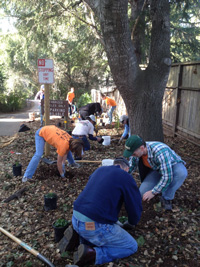
Planting native plants at Redwood Grove
Last Sunday, I participated in what has quickly become a new tradition for my church, Union Presbyterian Church. In every month that has five Sundays, we gather for a very short church/commissioning service, then fan out to serve the community. I chose to join a group that was doing some outdoor restoration work at Redwood Grove. Other groups did things that matched their talents: sewing blankets for teen moms and their babies, singing in the VA Hospital worship service, and helping in the kitchen at CityTeam International, for example.
UPC started doing Fifth Sunday service projects only this past year, but it has quickly caught on as a popular and well-attended activity. It feels good to get out into the community (and out of our comfort zones, frequently). I have had the opportunity to sing at a senior citizens’ home, to catalog books at Castro Elementary School, and to work on some improvements on the Los Altos-Palo Alto Bike Path.
While our faith calls us to serve others, community service is, or should be, for everybody. Projects like this have shown me how easy it is to make a difference with a group of people and a few hours of time. Think how much better our communities would be if we all got in the habit of doing something like this from time to time.
The next Fifth Sunday is April 29; I’m looking forward to it. Feel free to join us, or organize your own. You don’t have to wait for a Fifth Sunday to do it.
Photo courtesy of Tim Burks
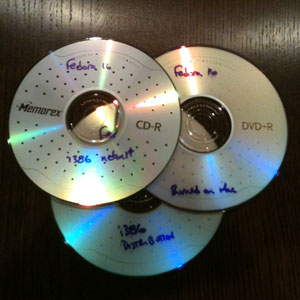 As in past years, the end of the year is the time for me to upgrade my home Linux server to a new version of Fedora (Fedora 16 this year). And as in past years, this process didn’t go smoothly, and to deal with that I lean heavily on search engines that lead me (frequently) to the blogs of others who have dealt with and fixed the same problems. As I did last year and the year before, I’m writing this article to contribute back my experiences in hopes that I may help someone else who runs into the problems I do.
As background, Fedora Linux versions are issued every six months or so, and no longer receive patches after version+2 is released. So I have been upgrading my system every two versions (every year) for the past several years. Particularly with respect to security vulnerabilities, it’s important to keep up to date with the latest patches.
So here’s a summary of my experience:
Distribution media boot problems
As I have done before, I downloaded the distribution DVD image via BitTorrent and burned a DVD+R. Last year the DVD booted smoothly, but this year it did not. I tried several things to rule out DVD drive problems: I booted last year’s Fedora 14 disk, and that worked fine, and I burned a Fedora 16 install disk using the drive on my MacBook Pro, and it failed to boot exactly the same as the one I burned directly on my Linux machine. My machine is somewhat older than my DVD drive, so it may not be a fully supported configuration, but that doesn’t explain why last year’s image booted OK. I unpacked the installation disk onto a partition on my network-attached storage, intending to use that for installation as I did two years ago.
So I downloaded and burned a network-install CD, which booted beautifully. However, I got ahead of myself somehow and ended up doing the upgrade directly from the Internet. It was perhaps a bit slower, but the upgrade went smoothly.
Graphics
As in the past, when the system did come up, the X Window System did not. As suspected, this was due to my graphics card (NVIDIA GeForce 6200) not being configured properly on Fedora 16. Some sort of a configuration problem has happened on each of the last two upgrades, so I was somewhat expecting this. This time, I disabled the default nouveau driver and downloaded and enabled the NVIDIA proprietary driver. Again no luck until I eventually recognized that the X11 configuration file, /etc/X11/xorg.conf, had the wrong name for the driver: “nv” instead of “nvidia”. After also making sure that the ModulePath included the NVIDIA modules (/usr/lib/xorg/modules/extensions/nvidia), the display came up.
However, after logging in, Gnome 3 announced that my graphics driver wasn’t supported and it was operating in fallback mode. I’m still not sure what I’m missing by being in fallback mode, but from reading some of the commentary on the Internet about Gnome 3, many people are happier with the fallback mode than the “real thing”. So I just forced fallback mode in System Info -> System Settings -> Displays, and I don’t get the annoying message any more. Some day I may try to get out of fallback mode, but it’s not a priority right now, because of problems with…
Networking
With the exception of the Mac, my experience with user graphical environments has generally been that they operate at a “higher layer” than the network stuff underneath. They generally accept whatever they’re given by the network, and with the exception of some graphical tools to make configuration easier, don’t mess with the network configuration much.
That has apparently all changed with Gnome 3. Perhaps in an effort to act “Mac-like”, Gnome 3 attempts to reconfigure the network interfaces and creates new logical interfaces. Because my interfaces were set as “unmanaged”, Gnome (specifically the NetworkManager application) didn’t actually do this, but I had trouble getting applications like Firefox and Thunderbird to connect to the network. I reconfigured them to Managed, and suddenly I lost the static IP configuration I had. I had to manually reconfigure them to get back to “normal”.
However, I noticed that I was getting a LOT of syslog messages. Every minute or so, syslog reported a configuration action including a number of errors such as:
NetworkManager[5700]: <error> [1325458737.135085] [nm-system.c:1061] nm_system_replace_default_ip6_route(): (eth2): failed to set IPv6 default route: -1
Despite the errors, IPv6 was working just fine, but I didn’t want the system generating all of these errors, so I disabled IPv6 and the errors stopped. I got busy with the search engines, and it appears that this is a problem that is shared with some other Unix variants, including Arch Linux and Debian. I haven’t seen any resolution to this; I have also submitted a question to the Fedora Forums regarding this problem. It appears that every time my router sends an IPv6 route advertisement, this error cycle restarts. It shouldn’t be doing anything unless the route advertisement has changed.
Following the disabling of IPv6, I got a lot of errors from named (the BIND name server) not being able to reach IPv6 addresses in the course of resolving addresses. I added the -4 option in /etc/sysconfig/named to cause it to only use IPv4 for the time being.
Bottom line: IPv6, for me at least, is basically unusable in Fedora 16. This is a serious deficiency.
Services
Fedora 16 has changed the way that system services (daemons, etc) are managed. While in the past this was done directly with the service and chkconfig commands, this is now done with the systemctl command. Fortunately, service commands are still accepted and translated into systemctl commands for those of us for whom habits die slowly.
One of the first things I noticed on upgrading to Fedora 16 is that dovecot, the IMAP server I use, no longer worked. It turns out that the service was disabled for some unknown reason. Re-enabling and starting the service solved the problem
But after a day or so I noticed that I was no longer receiving logwatch emails. It turns out that the crond process had similarly been disabled and was not running. While dovecot is something that not everyone uses, I am really puzzled about why cron would have been disabled.
Summary
This year’s Fedora upgrade involved about the same level of problems as previous years, with some chronic problems (boot, graphics) and some unique problems (networking, services). I am quite unhappy at having to disable IPv6 to keep the system from reconfiguring the network every minute or so; I hope this problem is fixed soon. Otherwise, this seems to have been an OK upgrade, but I’m glad this only happens once a year.
 This past week, I left my job at Cisco to begin work at OneID, an early-stage startup dedicated to improving online identity. After over 16 years at Cisco, it will be exciting and, honestly, scary to move to a company with 1/10,000th the employees.
When you’ve been at a company for such a long time, it’s easy to take for granted all the things one’s company does right and focus on the things it does wrong. At its core, Cisco sets a very high standard for honest and legal business conduct. Cisco encourages its employees to give back to the community, both through incentives like matching grants and by giving employees space to allow them to contribute their time and talent. I have been proud to call myself a Cisco employee.
I liken Cisco to an aircraft carrier: it’s very big and powerful, and shows up on all the radar screens. It has a lot of firepower at its disposal; I wouldn’t want to be in its crosshairs. But it’s also difficult to stop, turn or otherwise maneuver. The possibility of a member of the crew influencing its direction of the ship is virtually nil.
A zodiac boat, on the other hand, is all about speed and maneuverability. It’s a lot easier to point at something on the horizon and suggest to the Captain that we should go in that direction. Zodiac boats often operate “under the radar”, heading in a new direction amid the clutter of other vessels.
On an aircraft carrier, it is actually possible to go in a slightly different direction from the ship for a while. You do this by walking from one side of the deck to the other. But you’re well advised to stop before you get to the edge. I liken this to my recent experience at Cisco: my career direction was leading me off in a slightly different direction. Cisco was great in letting me explore that area (identity management), but there was only so far that I could go with it there.
Fortunately, I found a nearby zodiac boat, OneID, moving in the direction I want to travel. The captain (CEO) is an successful serial entrepreneur, Steve Kirsch, that was a classmate at MIT. I’m looking forward to the trip, even though I realize that I’ll no longer have a lot of the comforts of being on an aircraft carrier. The trip might be rougher, but I’ll be going in the direction I want. I’m looking forward to the journey.
Since the start of the Google Plus social networking service several weeks ago, quite a few users have had their Google+ accounts suspended because they created profiles using pseudonyms different from their “real” names. Many of those suspended use pseudonyms to have the freedom to express unpopular points of view or unorthodox sexual preferences, use a pseudonym in a professional context, or have pseudonyms for a variety of other reasons, some very personal. This has led to what is called the “nymwars”: users who have been suspended for using pseudonyms are protesting their suspension by Google+.
 Let me start by saying that I strongly support the need for anonymity and pseudonymity on the Internet. There are many users that would not feel the freedom to express their opinions freely if their identity is associated with their expression. For many of them, there is good reason for this as in some countries people are jailed or otherwise persecuted for opinions that differ from, for example, that of their government. The United States has a long tradition of anonymous political discourse, and there are other situations, such as whistle-blower programs and crime-tip hotlines, where anonymity and pseudonymity provide an easily demonstrable public good.
The question here is whether Google+ should be able to require its users to use their “real” names on the service, not whether attribution is required on the Internet as a whole. One could characterize Google+ as more like a place of business that is exercising its prerogative to set the rules for doing business there. If you don’t want to abide by the rules, go elsewhere.
My possibly unpopular opinion is that services on the Internet should decide what information they require of their users, and users should decide whether or not they are interested on that basis. Google+’s profile names policy has said that they require a user’s real name, and if there is a segment of the population that isn’t willing to abide by that, they should find another one that meets their needs. They are free to make their opinions known to Google and others, but it’s really Google’s call.
I’m not sure whether this stance on Google’s part is a good idea or not: they are effectively saying that people who want to use pseudonyms on their social networking service are not welcome there. Social networking services grow in value nonlinearly based on the number of users they attract, and Google+ is basically saying “go away” to some subset of them. But Google+ is a work in progress: they have said that commercial pages will be added in the future, and one of the motivations might be to discourage commercial pages for characters like “Joe Camel” or “Ronald McDonald” from being created.
On one of the mailing lists to which I subscribe, Mary Hodder expressed the opinion that Google’s (and Facebook’s) market power make them more like the Mall of America, where courts have ruled that they must be treated as public places. I’m not nearly well enough versed in the law (nor in the specific rulings) to know whether that applies here, but to me it seems like a bit of a stretch for a service as new as Google+ to be considered a public place so soon.
However, Google+ has been far from perfect in the implementation of their profile name policy:
- Some users with unusual (in many cases non-Western) names have been suspended
- Undoubtedly many people using pseudonyms that look like typical Western names are getting away with it
- Appeal procedures have been uneven. Many have been asked to prove who they are by providing a scan of a Government ID document
- The definition of allowable variations of legal name is fuzzy. The Google+ policy says that “if your full legal name is Charles Jones Jr. but you normally use Chuck Jones or Junior Jones, either of those would be acceptable” but it’s a lot less clear if you normally use a different last name.
I wouldn’t be surprised if Google was caught unprepared for some of these issues, or perhaps by the volume of complaints. The fact that people are complaining bitterly about the use of pseudonyms rather than simply leaving is a great compliment to the Google+ service; in some respects it is reminiscent of the New Coke debacle of the ’80s.
This is a very timely debate. The National Strategy for Trusted Identities in Cyberspace (NSTIC) has as one of its premises a very market-driven idea: that the relying parties (internet services you use) can specify what information they need from users, and users get to decide what “attributes” (personal information) they release to them. The availability of a trustable source for a user’s legal name would solve some of the issues above (although not the allowable variations problem). But would users have sufficient market power to decline to provide that information? It is the tussle over that market power that is at the heart of the “nymwars” issue.
Creative Commons-licensed image above from user clydesan on Flickr
This article is the final installment of a series about our recent vacation in Alaska. To see the introductory article in the series, click here.
On this last day of our trip, we again have an afternoon flight so we had a little time to walk around downtown Anchorage a bit more. As on Day 2, our first choice for breakfast had a long wait, but we found a quite reasonable alternative. We had seen a sign for All Alaska Tours, and we thought we would stop by and tell them what a great trip we had. When we got there, they had moved a few blocks away so we treated it as an opportunity to see some more of the city. We were surprised about the stores selling fur clothing, which is definitely not done around home.

A sign in Anchorage's Earthquake Park. We like their sense of humor.
We said “hi” and thanked Jessica, our travel arranger, who was probably startled by our unannounced visit but handled it well. We returned to the hotel to finish our packing and to try to figure out to do with the leftovers from our picnic lunches. We loaded the car, and having a little time to spare, stopped by Anchorage’s Earthquake Park. Here we learned a bit about what happened in Anchorage as a result of the 1964 earthquake, although we kept our visit short so as not to provide too much food for the mosquitoes.
Our flight was delayed about an hour and a half due to the late arrival of the incoming plane. Ted Stevens International Airport in Anchorage has a modern and attractive terminal, featuring free (and reasonably fast) WiFi and a few good shops, so the time passed quickly.
The flight went uneventfully. We collected our bags, went outside and waited for the parking shuttle. It was dark, for the first time in two weeks. We are home.
This article is part of a series about our recent vacation in Alaska. To see the introductory article in the series, click here.
We awoke today to weather that is apparently more typical for Seward: low clouds. It made it easy to forget all the mountains that are nearby. We packed, checked out of the hotel, and headed to the nearby Subway sandwich shop for breakfast that was quite passable.
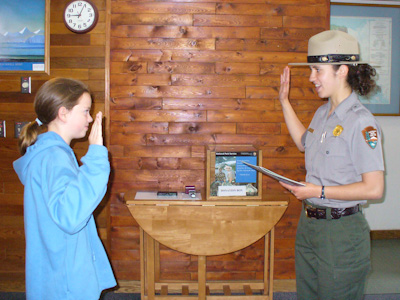
Junior Ranger Ceremony
After breakfast, we returned to the Kenai Fjords National Park visitor center so that Celeste could turn in her booklet for her Junior Ranger badge. Junior Ranger is a program the national parks have for kids 4-12 that encourages them to learn and explore, and to ask good questions. We had picked up a Junior Ranger booklet on the our first visit to the Exit Glacier visitor center. While Celeste knew the answers to many of the questions already, there was also an assignment that required her to interview a Park Ranger, and encouraging that kind of contact between kids and the rangers is always a good thing. She took an oath to protect the park (they always make it a good ceremony) and was given a small badge.
We then drove to the town of Whittier, a former military town. While not far off the main highway, Whittier is on the coast on the other side of a mountain, and is connected only through a one-way tunnel that is shared by vehicles and trains. There is a toll ($12 to go, free to return) and one waits in a queue not unlike that waiting to board a ferry until the tunnel is open in the direction you wish to travel.

Train entering the shared tunnel at Whittier
When we got to Whittier, there was heavy mist and it was fairly wet. We walked through its small waterfront with a few shops and restaurants and then through a tunnel to downtown. Downtown Whittier is not very attractive, with many derelict boats and a single high-rise condo building that nearly everyone lives in. The high-rise is a cold-war era military barracks built of heavy concrete to withstand both the harsh conditions and possible earthquakes and attack. We walked over to an adjacent building that housed the Whittier Museum and saw pictures of the aftermath of the great 1964 earthquake. Whittier was devastated by both the earthquake and by a tsunami that followed soon thereafter. Very little was left.
Returning from Whittier, we had our picnic lunch in Girdwood, a bit further toward Anchorage. Girdwood was preparing (girding?) for a town festival for the July 4 weekend, so we found a convenient parking place and had our picnic out of the back of the minivan.
Returning to Anchorage, we checked in again at the Marriott we had stayed at on Day 1. We went off to the Snow Goose where we had eaten that first evening, and all remarked on how quickly the two weeks had gone.
This article is part of a series about our recent vacation in Alaska. To see the introductory article in the series, click here.
Despite the weather forecast, today started off mostly sunny. We opted for breakfast at the hotel, which was pretty good but (as usual) marginally too much food.
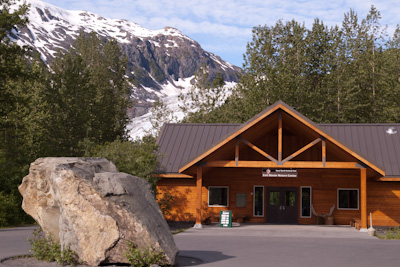
Exit Glacier Nature Center and Exit Glacier
We went back to Kenai Fjords National Park for the 10 am ranger-led hike to the edge of Exit Glacier. As usual, the ranger (a young woman) was very informative and was able to answer all of our questions well. At the end of the hike, we found out that this is her first season at this park; like many of the seasonal rangers, she moves from park to park as required, and has previously been at Pinnacles and at Lava Beds National Monument. It makes her knowledge of the park all that much more impressive.
Unlike the Root Glacier that we visited earlier in the trip, there was a deep crevasse between us and the glacier itself, so it was not possible to walk on it this time. Nevertheless, the blue glacial ice color is worth the trip by itself. We also learned a lot more about how the forest establishes itself on ground freed by the recession of the glacier.
Today’s picnic lunch was on the front balcony at our hotel room. In addition to the sizable rooms, they have tables and chairs that were suitable for us to set up our spread of food and sit very comfortably.
After lunch, we ventured back into downtown Seward. Seward has two parts: the southern “old town” and a somewhat more touristy district further north near the marina. We started with the old town, where Shirley, Kenna, and Celeste had a great time at a quilt shop, Jim found an electronics store, I found a great cafe (with Intelligentsia coffee!), and we all loved the bookstore.
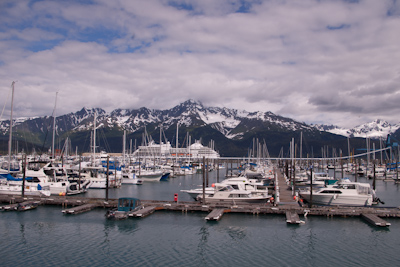
Seward Harbor
We then moved to the northern district, visiting the Kenai Fjords visitor center (excellent films), then checking out some souvenir shops and surveying possibilities for dinner. When it came time for dinner, our first choice, a Mexican cantina, was too crowded, so we opted for an adjacent restaurant that worked out fine.
This article is part of a series about our recent vacation in Alaska. To see the introductory article in the series, click here.
The weather forecast for the rest of our trip all seems to be the same: mostly cloudy with occasional showers. We have done pretty well with weather so far, and hope our luck holds out. This morning, as has frequently been the case, the weather seems somewhat brighter and nicer than the forecast would imply.
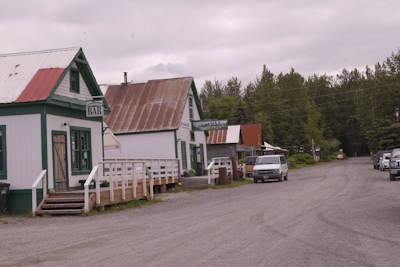
Main Street, Hope, Alaska
Breakfast was delivered to our cabin, and consisted of juice, pastries, and yogurt; all excellent. Then we took off for Seward, stopping off to replenish our picnic supplies. After passing through Anchorage, we enjoyed the very scenic drive on the Seward Highway along Turnagain Arm. The weather varied from partial sun to rain along the way.
We decided to make a side trip to Hope, Alaska, in part because Hope is Celeste’s middle name. Hope is a charming old gold mining town that was devastated (considerably reduced in size) by the great earthquake of 1964. We found a great place for a picnic lunch, and then walked around the town, visiting the museum and a couple of gift shops. The museum tour was particularly informative, as we were led around the buildings by “Billy”, who we would estimate to be at least in his 80s, who kept referring to the “old timers” he learned so much from.

Hope Museum exhibits
Our hotel, the Seward Windsong Lodge, is just north of town on the road to the Exit Glacier area of Kenai Fjords National Park. Our rooms were enormous, a welcome change from many places where we have had to step over our suitcases to get around. After checking in, we made a trip out to the park to scout out hiking opportunities for tomorrow. We decided on a 10 am hike to the edge of the glacier. We then headed downtown for dinner and a little souvenir shopping.
 Altmode