

I thought it would be useful to write down my thoughts on the past months’ disclosures from Edward Snowden, the contractor who made off with and has leaked a vast trove of classified NSA documents. The main reason for doing this is to help gel my own opinions, but it may be interesting to others as well. The Snowden situation is very complex, and as you will see I can’t label him as either a hero or a traitor: he is a little of both, or a little of neither.
Read more…

Last week, I blogged about my experiences using MySQL with a relatively large set of data: 10 GB and 153 million records. A lot of things worked well, but a few were surprisingly slow. This week, I’ll try to do roughly the same things with MongoDB, a popular “NoSQL” database, to get experience with it and to test the assertion that NoSQL databases are better suited for Big Data than traditional databases. This is my very first experience with MongoDB, so this is coming from the perspective of a complete newbie. There are probably better ways to do many of the things I’m describing.
One of the nice things about MongoDB is that it is schemaless. One just needs to give names to the columns (now known as fields) in the input data, and it will figure out what type of data is there and store it accordingly. If some fields are missing, that’s OK. So the data import is considerably easier to set up than with MySQL, and it doesn’t generate warnings for rows (now called documents) that have ridiculously long user or domain names.
That is not to say that mongoimport was trouble-free. There is a 2 GB limitation on databases when using MongoDB in 32-bit mode, but I hadn’t paid much attention. When I imported the data, it began fast but slowed down gradually, as if it was adding to an indexed database. After running overnight, by morning it had slowed to about 500 records/second. A friend looked at it with me, and suggested I look at the log file, which contained an tens of gigabytes of error messages telling me about the 32-bit limitation (had I known to look). It would have been preferable for mongoimport to have thrown an error than to have silently logged errors until the disk filled up. So if you’re dealing with any significant amount of data, be sure you’re running the 64-bit version (I had to upgrade my Linux system to do this), and remember to check the log files frequently when using MongoDB.
Once I upgraded to 64-bit Linux (a significant task, but something I needed to do anyway), the import went smoothly, and about three times as fast as MySQL.
Here are timings from the same, or similar, tasks tried with MySQL:
| Task | Command | Time | Result |
| Import | mongoimport –d adobe –c cred –file cred –type tsv –fields id,x,username,domain,pw.hint |
1 hr 1 min | 152,989,513 documents |
| Add index | db.cred.ensureIndex({domain:1}) | 34 min 29 sec | |
| Count Cisco addresses | db.cred.find({domain:”cisco.com”}).count() | 0.042 sec | 8552 documents |
| Count domains | db.cred.aggregate([{ $group: { _id: “$domain”} },{ $group: { _id: 1, count: { $sum: 1 } } } ]) | 3min 45 sec | 9,326,393 domains |
| Domain popularity | Various | See below | |
| Count entries without hints | db.cred.find({“hint”:{“$exists”:false}}) .count() | 3 min 39 sec | 109,190,313 documents |
One of the striking differences from MySQL is the command structure. While MySQL operations have somewhat of a narrative structure, MongoDB has a much more API-like flavor. The command shell for MongoDB is, in fact, a JavaScript shell. I’m not particularly strong in JavaScript, so it was a bit foreign, but workable, for me.
Several of the commands were, as expected, faster than with MySQL. But commands that needed to “touch” a lot of data and/or indexes thrashed badly, because MongoDB is an in-memory database and ran up to about 90 GB of virtual memory, causing many page faults when the data being accessed were widely dispersed.
It was when I tried to determine the most frequently used domains that things really got bogged down. I tried initially to do this with an aggregate operation similar to the domain count command, but this failed because of a limitation in the size of the aggregation it could perform. I next tried MongoDB’s powerful MapReduce capability, and it seemed to be thrashing the server. I finally wrote a short Python program that I thought would run quickly because the database was indexed by domain and could present the documents (records) in domain order, but even that got bogged down by the thrashing of the database process when it went to get more data. Using a subset of 1 million documents, these methods worked well, but not at the scale I was attempting, at least with my hardware.
So there were things I liked and didn’t like about MongoDB:
I Liked:
- API-style interface that translated easily into running code
- Speed to find records with a limited number of results
- Loose schema: Free format of documents (records)
I Disliked:
- Cumbersome syntax for ad-hoc “what if” queries from the shell
- Speed of processing entire database (due to thrashing)
- Loose coupling between shell and database daemon: terminating the shell wouldn’t necessarily terminate the database operation
MongoDB is well suited for certain database tasks. Just not the ones I expected.
I have been using databases, probably MySQL and PostgreSQL, for a variety of tasks, such as recording data from our home’s solar panels, analyzing data regarding DKIM deployment, and of course as a back-end database for wikis, blogs, and the family calendars. I have been impressed by what I have been able to do easily and quickly, but (with the possible exception of the DKIM data I was analyzing while at Cisco) I haven’t been dealing with very large databases. So when people tell me that NoSQL databases are much faster than what I have been using, I have had to take their word for it.
The breached authentication database from Adobe has been widely available on the Internet, and I was curious how a database of that size performs and if there were any interesting analytics I could extract. So I recently downloaded the database and imported it into MySQL and MongoDB, a popular NoSQL database. I’ll describe my experiences with MySQL in the rest of this blog post, and MongoDB in my next installment.
The database contains each account’s username (usually an email address), encrypted password, and in many cases a password hint. The passwords were stored in an “unsalted” form, meaning that two users with the same password will have the same encrypted password, permitting analysis of how many users have the same passwords (though we don’t know what that password is). I’m not interested in anyone’s password, although guessing common passwords from the hints used by different users has become a popular puzzle game in some groups. I’m not interested in email addresses, either. However, it’s interesting (to me) to see what the predominant email providers are, and to see the distribution of the same passwords are used, and to experiment with using the database to extract some analytics like this from such a large set of data.
The database, often referred to as users.tar.gz, uncompresses to a file just under 10 GB with about 153 million records. I wrote a simple Perl script to convert the file to a more easily importable form (fixing delimiters, removing blank lines, and splitting email addresses into username and domain). Importing this file (on my 3.33 GHz quad-core i5 with 8 GB memory) took just under 3 hours. I got quite a few warnings, primarily due to extremely long usernames and domain names that exceeded the 64-character limits I had set for those fields.
Here are a few sample timings:
| Task | Command | Time | Result |
| Import | LOAD DATA LOCAL INFILE “cred” INTO TABLE cred; | 2 hr 58 min | 152,988,966 records |
| Add index | ALTER TABLE cred ADD INDEX(domain); | 2 hr 15 min | — |
| Count Cisco addresses | SELECT COUNT(*) FROM cred WHERE domain = “cisco.com”; | 0.12 sec | 8552 records |
| Count domains | SELECT COUNT(DISTINCT domain) FROM CRED; | 9,326,005 domains | 47 sec |
| Domain popularity | SELECT domain, count(*) AS count FROM cred GROUP BY domain ORDER BY count DESC LIMIT 500; | 3 min 0 sec | Top domain: hotmail.com (32,571,004 records) |
| Create domain table | CREATE TABLE domains SELECT domain, COUNT(*) AS count FROM cred GROUP BY domain; | 9 min 14 sec | |
| Index domain table | ALTER TABLE domains ADD INDEX(domain); | 5 min 40 sec | |
| Null out blank hints | UPDATE cred SET hint = NULL WHERE hint = “”; | 3 hr 45 min | 109,305,580 blank hints |
| Password popularity | SELECT pw, COUNT(pw) as count, COUNT(hint) as hints FROM cred GROUP BY pw HAVING count>1; | See below |
One thing that is immediately obvious from looking at the domains is that the email addresses aren’t verified. Many of the domain names contain illegal characters. But it’s striking to see how many of the domains are misspelled: Hotmail.com had about 32.5 million users, but there were also 62088 hotmai.com, 23000 hotmal.com, 22171 hotmial.com, 19200 hotmil.com, 15200 hotamil.com, and so forth. Quite a study in mistypings!
I’m puzzled about the last query (password popularity). I expected that, since the database is indexed by pw, it would fairly quickly give me a count for each different pw, like the domain popularity query. I tried this with and without limits, ordering of the results, and with and without the HAVING clause eliminating unique values of pw. At first the query had terminated with a warning that it had exceeded the size of the lock table; increasing the size of a buffer pool took care of that problem. But now it has been running, very I/O bound, for 12 hours and I’m not sure why it’s taking that long when compared with the domain query. If anyone has any ideas, please respond in the comments.
Even with 153 million records, this is nowhere near the scale of many of the so-called Big Data databases, and gives me an appreciation for what they’re doing. I’m not a MySQL expert, and expect that there are more efficient ways to do the above. But I’m still impressed by how much you can do with MySQL and reasonably modest hardware.
Before Twitter was in the mainstream, people used to ask me to describe it. I would answer that it is sort of like a cocktail party conversation: people talking with the intent that others will hear them, and little expectation of privacy. At this “party”, you can position yourself to hear the people you want to hear, and others can do the same. But unlike a cocktail party, positioning yourself to hear someone else (following them) doesn’t necessarily make your voice heard by them, although it sometimes works out that way (they follow you back).
I’m an avid user of Twitter. It’s where I hear of breaking stories, both from the news media and in my friends’ lives. I can’t think of a major news story recently that I didn’t first hear of through Twitter. Like everything else on the Internet, you need to evaluate the source of what you hear (and perhaps more, as in the case of the @AP breach). I curate the list of accounts I follow to get the content I want, and I’m constantly struggling with keeping the number of Tweets I have to peruse to a reasonable level.
The trouble is that many of the accounts I follow on Twitter repeat the same things. If they retweet each other, Twitter is clever enough to only display it to me once. But if they retweet with a comment or make a similar comment on the same issue: here come the duplicates. I have the same problem with several people citing the same article: it’s hard to detect, particularly when they use URL shorteners to refer to the article.
There is a more insidious problem with this: the way that I typically discover new accounts to follow (mentions/retweets, Twitter suggestions, etc.) tends to get me more accounts to follow with the same point of view. I often don’t have the benefit of thoughtful comment on the opposite side of issues. I greatly prefer to hear well thought-out opinions on both sides of an issue than to hear the same opinion over and over. Hearing the same opinion all the time leads to confirmation bias and contributes to the polarization of our society, and I worry that Twitter and other social media are, by virtue of their extreme personalization, short-circuiting the sort of public discourse that makes our society great.
I have a few friends on Twitter that I disagree with politically, but I enjoy reading their comments because they are well thought out and force me to think about some issues more completely. I wish I had more people like that to follow, and will try to seek some out and perhaps replace a few of the repetitive voice I currently follow with some of them.
Do yourself a favor and see if you can replace some of the “echoes” on your Twitter feed with others that bring different but well thought-out points of view. If it takes longer to go through your tweets because you have more to think about, it’s worth the time.
Photo credits: Eastern Bluebird–male by Flickr user Patrick Coin and western bluebird male by Flickr user Devra used under Creative Commons license.
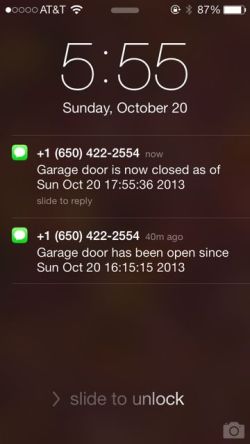
I’m glad we live in a low crime area: I have a tendency to leave our garage door open, sometimes all night. I have even considered installing a warning light over our bed to make sure that doesn’t happen. Instead we have tried to be more disciplined, but we’re not perfect. My wife recently asked if there is some way to have our garage door alert us when it is left open.
A few months ago, I designed and built an interface that allows authorized users to open and close our garage door with a web application that uses OneID identity management technology. Part of that interface, although not shown in the YouTube video, allows the user to see whether the door is currently open or closed, so they can be sure what’s happening if they want to operate it remotely. Given that this is done with a Raspberry Pi processor running Linux that has access to the state of the garage door, it should be a simple matter to monitor the door and generate alerts. And it is.
The monitoring of the door is very straightforward. The socket interface provided by the Raspberry GPIO Daemon easily supports multiple clients, so long as none of them keeps their socket connection to the daemon open except when they’re actually using it. So it was just a matter of writing another daemon (background process) that wakes up periodically, checks the state of the door, and generates an alert if some criteria have been met.
I considered a couple of different ways of alerting. The most straightforward seemed to be to send a text message to each of our cell phones. This can be done by sending an email to the appropriate email address provided by the mobile carrier, but this seemed susceptible delivery delays and has many dependencies on intermediaries that could interfere with its reliability. Instead, I tried using Twilio, a provider of an API that allows one to send and receive text messages and phone calls. Sending text messages in this way costs very little, and seems to provide very prompt delivery.
Both my wife and I receive the notifications, so it made sense to generate a second notification when the door is closed following a “door left open” alert. This saves a lot of “did you get the door?” messages between us. We have the monitor set to alert after the door has been open for an hour, and it has already been helpful.
The code for the Garage Door Minder is straightforward, but needs some work before it will be ready to post to GitHub. If there is sufficient interest, I’ll clean it up and get that done.
There are lots of useful control and notification alert applications for internet-connected devices (the so-called Internet of Things) in the home. Here’s a modest example.

I have wanted to set up a Virtual Private Network (VPN) to my home for quite a while, but have never gotten around to it. Here are some reasons I wanted one:
- It gives me easier access to files stored on my home machines while I’m away.
- I want to control home devices (like my Insteon thermostat) while I’m away.
- It allows me to use my home IP address. This is important because I control access to some of my outside resources (virtual private servers and the like) by IP address, as an additional layer of security.
- Data I send over open WiFi networks is encrypted.
Since I am using more WiFi in coffee shops and other public places recently, I found the motivation to get this done. I expect that more people will be looking for this kind of capability as the “Internet of Things” becomes more popular and they want secure access to sensors and controls in their homes.

It seems like everyone is using shortened URLs these days. These are, of course, the links that begin with a very short hostname with a name like bit.ly, and tinyurl.com. There are also site-specific URL shorteners like nyti.ms (New York Times), cs.co (Cisco), t.co (Twitter), 1.usa.gov (US Government), and of course wp.me (WordPress).
The original premise of having a shorter URL was, of course, to save typing. With the emergence of Twitter and its 140-character limit, URL shortening became more important: it saved characters. But the real reason many sites use URL shorteners is different; most URL shorteners provide analytics about who clicked the link. And therein lies one of the problems I have with them.
Here are the things I don’t like about URL shorteners:
They obscure the true target of the link, a potential security issue. While some URL shortening services have tools to allow you to preview the link before clicking on it, I doubt that many people use them (I typically don’t). With more and more malware being delivered via vulnerabilities in browsers and their plug-ins, the ability to see what we’re clicking on is essential.
They don’t necessarily shorten anything. Sometimes the target of a shortened URL will be short anyway. I’d much rather that they left the original in place.
They slow things down. How much time have you spent looking at a browser window similar to the mobile browser in the illustration? IN many cases there are multiple layers of URL shorteners added by various parties, and each adds its own overhead.
People rarely type URLs anyway. The cryptic URLs in shortened links are often harder to type correctly than the originals, so there just isn’t an ease of use justifiction.
They require extra context. I follow a few accounts on Twitter that frequently tweet shortened URLs with no description attached. I might actually click on these if I could see something about the subject of the link, either in descriptive text or by looking at an unshortened link directly. But if descriptive text is needed, doesn’t that defeat the benefit of shortening (other than analytics)?
They may contribute to third-party tracking of what I read. I notice that I have cookies in my browser from bit.ly, tinyurl.com, and probably others. To the extent that they have visibility about shortened URLs that I visit, they may be able to reassociate that with me in some way.
In short (so to speak!), “URL shorteners” is a misnomer. They’re not about shortening, but about collecting information on who is reading what. They put the interests of the sender ahead of my interests as receiver. At the very least, if you’re not actively using the available analytics, don’t use them. They aren’t really helping your readers.
Update 3 June 2014: In This URL shortener situation is officially out of control, Scott Hanselman documents further the number of redirects that may be involved when one accesses a shortened URL. He also points out an additional justification for URL shorteners, at least in the case of Twitter: that it provides a clean way to break a link to harmful content, such as malware.
 The Police Department in my city, Los Altos, California, and many others nearby were recently given Automated License Plate Readers (ALPRs) as part of a grant from the Department of Homeland Security. Having heard about this in the local newspaper, I decided to learn more about ALPRs and to participate in public discussions about their use.
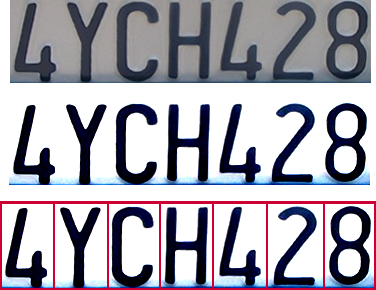
For those who aren’t familiar with them, ALPRs are cameras that are either attached to vehicles or fixed that can automatically take a picture of the license plate of a passing car, perform optical character recognition on it, query a database to see whether it is wanted, and keep a record of the encounter for future use. I first became aware of ALPRs when I read an article a year or so ago about their use in Minneapolis. One of the local newspapers in Minneapolis had submitted a public records request for automated license plate reader data on the Mayor’s car, which was retained for up to a year. The newspaper obtained that data, resulting in calls for making that data private and for shortening the retention period for the data.
In our city, compelling justifications for the license plate reader were provided. By not requiring the driver of the police car to individually type in and check license plates, more cars with warrants could be stopped. And by recording the cars leaving a crime scene, there was a higher chance of catching a fleeing criminal. Neither of these uses requires much retention of the data. But the data would be also shared with law enforcement agencies at the county and regional levels (and perhaps higher; that was never quite clear to me) and would be retained for a minimum of one year. The data would only be used for a valid law-enforcement purposes.
The retention period for the data is critical. The one-year retention is based on a California law requiring minimum retention periods for public records by cities, and license plate data is considered to be a public record. But with longer retention periods, there is a greater opportunity to discern patterns of activity of individuals, which may be subject to misinterpretation. Fortunately the California Highway Patrol is not subject to that particular requirement, and keeps ALPR data for only 60 days. A few other municipalities also haven’t applied the one-year public record rule to ALPR data, such as Tiburon, although they are notable for their use of ALPRs on all traffic entering the leaving their city.
I was very happy that the Los Altos City Council took up this issue, providing an opportunity for public discussion and policy making. It was also an opportunity for our Chief of Police, who had obviously studied the ALPR issue extensively, to educate all of us on their use of ALPRs and their data. One of the issues that surfaced was that the county, where our ALPR data would be stored, hadn’t set a retention policy for the data and it wasn’t clear when they would do so. The Council decided to approve the use of a single ALPR for one year with an understanding that the data retention issue needed to be settled by then.
While this public process around police-collected ALPR data worked well (even though I would have preferred that we seek a shorter retention period), private companies operate ALPRs as well, with no oversight. The most common private users of ALPRs is auto repossession companies, who find it them to be an efficient way to identify target cars. But their data have no restrictions on their use and retention, and companies like , and companies like MVTRAC have been successful at blocking efforts to limit their retention of data. This unrestricted data can be used by data brokers and others to do the same activity pattern analysis that is of concern when done by the government, and is available to virtually anyone willing to pay for the data. If it is the government that one is concerned about, remember that they could use private companies as a loophole to obtain data that they aren’t legally able to collect themselves.
I thank our Chief of Police, Tuck Younis, for several informative discussions on this subject.
Resources:
My public comment to the City Council:
To: Los Altos City Council
From: Jim Fenton
Date: September 15, 2013I’d like to thank the Council for considering the topic of Automated License Plate Readers in Los Altos.
The report from Chief Younis and coverage in the August 7 Town Crier point out a lot of good reasons for Los Altos to have a license plate scanner. The uses described for the scanner emphasize those that require little or no data retention: checking vehicles quickly for active warrants or observing those leaving a crime scene. But the scanner will also record the images it collects, along with the associated date, time, and GPS coordinates and upload them to a database. The question for me is how long is that data retained, with what agencies is it shared, and how may it be used by all of those agencies?
My biggest concern is the sharing of collected information with other agencies, such as the County and the Northern California Regional Intelligence Center. What are their policies on use, retention, and further sharing of the information? If Los Altos wants to restrict the retention and use of that data, will they comply?
There is also the question of privately-operated ALPRs. These collect license plate data with no restrictions on the use or retention of that data. Should that be permitted in Los Altos?
The vast majority, over 99%, of data collected by ALPRs will be of law-abiding citizens. With such a vast amount of information that can reveal personal habits and associations, the potential for abuse is there. While I trust our local police department and want them to have the best tools to keep Los Altos safe, I hope we consider the consequences and potential harms of broad tracking of our citizens.
Jim Fenton
Image Credit: California_license_plate_ANPR.png by Wikipedia user Achim Raschka used under Creative Commons license.

July 13, 2013
Last night was Friday night, and Friday nights in Reykjavík are somewhat notorious for late-night partying, so we were wondering how much we would be woken up. Fortunately not all that much. I woke up about 3:20 and could hear a faint thump-thump of some music somewhere, looked out and saw some people out walking on the square across from the hotel (it was light, of course). But I easily got back to sleep. About 5, some people seemed to be arguing outside, but this wasn’t too much of a concern because we had to get up at 5:30 anyway to catch the shuttle to the airport.

Celeste checking out the souvenirs at the duty-free shop
Along the way, I learned via Twitter that the runway at SFO that had been closed due to the Asiana Airlines crash a week ago had been reopened. This was very good news. There had been reports of two-hour ground holds due to congestion caused by SFO having one fewer runway than usual.
We got to Keflavík airport and received our boarding passes, and I noticed that Celeste’s had the “SSSS” designation for random “enhanced” security inspection. But we got through security with no trouble, grabbed some breakfast, and cruised the duty-free shopping.
While waiting at the gate to board, Celeste was paged. This was the time for her additional screening. I accompanied her; after they checked with me, a female security person gave her a quick pat-down and then looked through her backpack. The security person then swabbed her gloves for the mass spectrometer test, looking for explosive residue. No problems, of course, so we were brought back to the gate and expedited onto the plane.
On the jetway, Celeste told me that she was missing her boarding pass for the connecting flight to SFO, which I told her not to worry about. But she looked at her seat assignment and it was for the wrong seat (not with Kenna and me) and then noticed that it had the wrong name as well. Most seriously, the passport she was given after the pat-down wasn’t hers either! We found the passenger whose passport it was, and traded his passport for Celeste’s. All of us were very relieved; it would have been a big problem later.
The flight to New York was unremarkable, but New York felt unlike Reykjavík in many ways. Being in crowds was a bit of an adjustment. While we waited for the next flight, Celeste took advantage of the opportunity to call one of her friends on the phone. Although she enjoyed the trip greatly, she missed her friends.
The flight to San Francisco was routine but turbulent, and we arrived home to find things in good order. Could it have been possible that we woke up in Reykjavík this morning?
This article is the last in a series about our recent vacation in Iceland. To see the introductory article in the series, click here.
July 12, 2013
The Blue Lagoon, a famous public bath west of Reykjavík, is one of those things that everyone who goes to Iceland does. Our tour included a voucher for admission, so we started the day with a trip there. We grabbed our swimsuits and towels, walked a kilometer or so to the bus station, purchased tickets, and made our way there.

Jim and Kenna, wearing silica mud, in the Blue Lagoon
There was quite a line to get in. Eventually we turned in our voucher and received RFID wristbands that let us through the turnstile. The changing rooms were large, modern, and immaculately clean. The same wrist bands were used to lock our lockers (and subsequently open them, of course).
The Blue Lagoon is in many respects a larger version of the nature baths we used at Lake Mývatn. For some reason, the water is less slippery. But the Blue Lagoon has a number of extras, including a beverage bar in the lagoon where they record your purchase with the RFID wristbands and containers of silica mud to smear on your face which is supposed to have a beneficial effect. Alas, I didn’t notice any beneficial effect from the mud.

Viking ship sculpture
After returning to our hotel, we set out for a bit of souvenir shopping, along with lunch from Glætan, the café where we had breakfast on Day 2. Iceland is not an inexpensive place to shop, so we did a lot more looking than buying. Late in the afternoon, we took a walk over to the Viking ship sculpture along the harbor, which was well worth a bit of a walk. That also took us past the opera house, a beautiful piece of architecture.
We decided to do a bit of a splurge for dinner this evening, and we chose Við Tjörnina, a fish-themed restaurant across the street from the Alþingi (parliament). The restaurant has the feel of an older home, with seating in a number of small rooms. The fish and lamb were all excellent, likewise the smoked salmon and seafood bisque starters, and the chocolate cake for dessert was ultra-decadent. Service was friendly as well. Overall, a fine close to the trip.
This article is part of a series about our recent vacation in Iceland. To see the introductory article in the series, click here.
 Altmode